


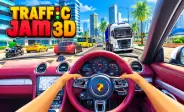
Traffic Jam 3D
Fill the form and submit.










Traffic Jam 3D is a fast-paced driving game where you control a car through busy roads and highways. You need to avoid traffic, maintain control, complete missions, and earn money during your drives. The game combines quick reactions with careful driving, so simply going fast is not always enough.
You can choose different modes, explore several road settings, upgrade your vehicle, and unlock new cars. Each mode gives you a different goal, while the Career mode adds a large set of missions that become harder as you progress.
Master the Controls
- Up Arrow: Accelerate
- Down Arrow: Brake
- Left Arrow: Steer left
- Right Arrow: Steer right
- C: Change camera view
- N: Use Nitro
Start Your Driving Journey
You can start the game directly in your web browser. After loading the game, choose a mode and select your preferred track or road setting when available. If you enjoy fast highway driving, Highway Racer 2 also gives you a chance to weave through traffic while trying to maintain high speed.
Your car begins moving once you start the drive. You need to watch the traffic ahead and choose when to change lanes. Cars and trucks can appear in different lanes, so you should always leave enough space to react.
Choose From Four Game Modes
- Career Mode: Complete 80 levels with specific missions. Tasks can include reaching checkpoints, earning points, or covering a required distance within a time limit.
- Infinite Mode: Drive for as long as possible without a fixed mission. Your main goal is to avoid crashes and see how far you can travel.
- Time Against Mode: Race against the clock and try to cover as much distance as possible before your time runs out.
- Free Mode: Practice driving without strict missions or time pressure. This mode lets you explore the road at your own pace.
Explore Different Road Settings
The game offers different environments that can change the look and feel of your drive. Depending on the mode and your progress, you can access Highway, Desert, and City tracks. For another racing experience focused on speed and track control, PolyTrack lets you race on custom-built courses with turns, ramps, and jumps.
The Highway setting focuses on busy road traffic. Desert roads provide a different environment, while City tracks give you another driving area to explore. You can also adjust some settings in supported modes. These can include the time of day, such as morning, sunset, or night, along with one-way or two-way traffic.
Avoid Traffic and Crashes
Traffic is one of the biggest challenges in the game. You need to watch cars and trucks while keeping your own vehicle under control. Some vehicles can change lanes, which means you cannot always follow the same path. Look ahead before moving into another lane and avoid sudden steering.
Driving very close to other vehicles can increase your score, but it also gives you less room to react. When the road becomes crowded, reducing your speed can give you more control.
Earn Money and Upgrade Your Car
The main upgrade areas include:
- Speed: Helps your car reach higher speeds.
- Handling: Makes steering easier and more controlled.
- Brakes: Helps you slow down when traffic becomes heavy.
- Durability: Gives your vehicle better support during difficult drives.
The game also includes 20 unlockable car models. Better vehicles can help you handle later missions and improve your overall driving performance.
Improve Your Driving Skills
- Balance Your Speed: Use acceleration, steering, and braking together instead of focusing only on speed.
- Look Ahead: Watch several cars ahead so you have more time to react to traffic.
- Change Lanes Smoothly: Make controlled lane changes instead of sudden movements.
- Slow Down in Heavy Traffic: Reduce your speed when the road becomes crowded and look for a clear route.
- Focus on the Mission: In Career Mode, follow the level objective instead of only trying to get a high score.
- Plan Your Route: Choose a safe path early so you can avoid last-second moves.
- Practice Timing: Learn when to accelerate, brake, or change lanes to handle difficult sections better.
Useful Tips for Better Runs
- Watch Ahead: Look for traffic before changing lanes.
- Control Your Speed: Slow down when the road becomes crowded.
- Use Smooth Steering: Avoid sudden movements near other vehicles.
- Save Nitro: Use it on clear roads instead of busy sections.
- Upgrade Wisely: Improve handling and brakes when control becomes difficult.
- Retry Failed Runs: Use mistakes to understand difficult sections.
- Choose the Right Car: Unlock stronger vehicles as missions become harder.









Spacebar Mode
Spacebar Hits
Spacebar games